What Is an Interview IDE? A Complete Guide for Technical Hiring Teams
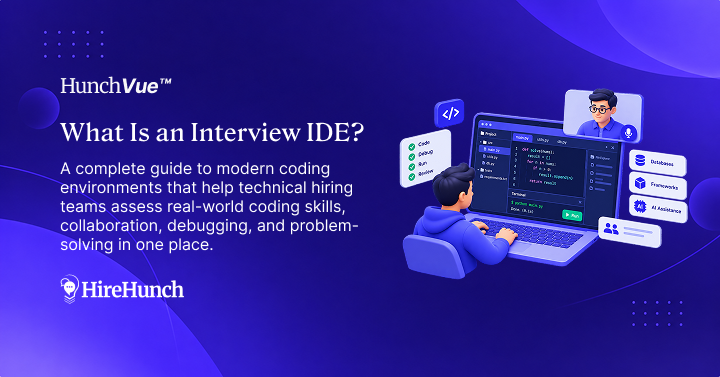
An interview IDE is a browser-based integrated development environment purpose-built for technical interviews. It allows candidates and interviewers to write, run, debug, and review code collaboratively in real time, often supporting multi-file projects, frameworks, databases, and even AI coding assistants. Interview IDEs are designed to simulate real-world software development environments for more accurate engineering assessments.
Technical hiring teams face a critical shift: the skills and workflows that make software engineers successful today are complex and collaborative, not just algorithmic or syntactic. Evaluating these capabilities requires more than a basic code editor or whiteboard. Interview IDEs have emerged as a direct response, aiming to create interview conditions that closely mirror modern engineering environments. Choosing and implementing the right interview IDE is now an operational decision that directly impacts hiring quality, candidate experience, and team efficiency.
What Is an Interview IDE and How Does It Differ from Traditional Coding Editors?
An interview IDE, or Integrated Development Environment for interviews, is a cloud-based tool that enables candidates to solve coding challenges, build projects, and interact with interviewers in real time. Unlike standalone code editors or text-based pads, interview IDEs are structured to replicate the real tools and environments engineers use for software development.
Key Features that Distinguish Interview IDEs
- Project-based multi-file support
- Pre-built environments for different frameworks and languages
- Interactive debugging capabilities
- Database and API integration
- Live collaboration and pair programming
- AI coding assistants and code completion tools
- Session recording, playback, and activity monitoring
Why Not Use Standard Code Editors for Interviews?
Standard editors or single-file code pads lack the depth, structure, and collaboration required for comprehensive technical assessments. They can obscure an engineer’s workflow, oversimplify problem-solving, and fail to capture how candidates adapt to real engineering tasks.
What Are the Core Capabilities of a Modern Interview IDE?
To accurately evaluate candidates, a modern interview IDE offers several advanced features aligning with contemporary engineering practices. The best interview IDEs go beyond syntax validation or algorithmic quizzes by introducing complexity, flexibility, and context.
- Multi-File Project Support: Candidates can navigate and modify multi-file codebases, mirroring tasks like adding features or fixing bugs in real repositories.
- Real-Time Collaboration: Both interviewer and candidate can edit code simultaneously, discuss approaches, and observe workflows – essential for assessing communication and pair programming skills.
- Frameworks and Stack Environments: Ready-to-use setups for frontend, backend, full stack, database, DevOps, and specific languages allow teams to interview for technology-specific roles without time lost on configuration.
- Debugging and Logging Tools: Integrated debuggers, logging panes, and console outputs let interviewers see how candidates troubleshoot real problems.
- Database and API Access: Many platforms provide live SQL execution and API endpoints, reflecting business logic and data-driven problem-solving.
- AI Assistance: Selected interview IDEs incorporate coding AI (such as contextual autocomplete or code explanations), allowing teams to assess how candidates responsibly use these tools – an increasingly important engineering skill.
The more an interview environment replicates the tools, decisions, and collaboration of real software development, the more predictive your hiring process becomes – focusing evaluation on what truly matters for engineering success.
When Should Technical Hiring Teams Use an Interview IDE?
Not every interview requires a full-featured development environment, but increasing project complexity, broader tech stacks, and the rise of remote interviewing make interview IDEs essential for specific use cases.
High-Impact Interview Scenarios
- Full-stack or framework-specific interviews (e.g., React, Node, Django)
- Assessing debugging, troubleshooting, or code review skills
- Role simulations such as integrating with APIs, data modeling, or live database queries
- Pair programming or collaborative scenario interviews
- Evaluating how engineers use AI coding assistants in practice
Signs Your Current Process Would Benefit from an Interview IDE
- Difficulty assessing candidates beyond algorithmic or textbook problems
- Inconsistent interviewer evaluation due to subjective formats
- Challenges with remote or distributed technical interviews
- Poor candidate experience and negative interview feedback
Interview IDEs vs. Coding Assessment Platforms: What’s the Difference?
Interview IDEs and coding assessment platforms are both used in the technical hiring process but serve different purposes and workflows. Understanding the distinction helps teams design an effective, candidate-centric interview journey.
Coding Assessments: Screening and Skill Validation
- Typically used early in the funnel for skill screening
- Automated grading of algorithmic, multi-choice, or project tasks
- Limited real-time collaboration; mostly asynchronous
- Best for narrowing down a large applicant pool efficiently
Interview IDEs: Deep-Dive and Live Evaluation
- Interactive, real-time coding with an interviewer present
- Focus on problem-solving process, code comprehension, debugging, and communication
- Support for realistic engineering scenarios not possible in static assessments
- Enables collaborative tasks and direct observation of candidate workflows
Some platforms integrate both assessment and live interview capabilities for unified hiring ops. Properly sequencing assessments and interview IDEs maximizes both efficiency and evaluation depth.
Evaluating Interview IDE Features: What Matters for Real-World Engineer Assessment?
Choosing an interview IDE is not a one-size-fits-all decision. Hiring teams should align product capabilities with required technical evaluation depth, stack compatibility, team size, and hiring workflow.
Checklist of Interview IDE Evaluation Criteria
- Supports languages, frameworks, and stacks you hire for
- Multi-file and project-based environments (not just single-file pads)
- Integrated debugging, console, and logging functionality
- Database and API access for realistic backend tasks
- Real-time collaborative editing and pair programming
- Integrated video, whiteboarding, and live feedback
- AI coding assistance with controls and activity tracking
- Recording, playback, and reviewer-friendly evidence
- Structured evaluation tools (scorecards, notes, tags)
- Proctoring, suspicious activity monitoring, and security
- Candidate experience: performance, browser compatibility, accessibility
How to Run a Structured Evaluation Process for Interview IDEs
- Map core technical workflows (e.g., backend debugging, front-end demo, collaborative problem solving).
- Create trial interviews using realistic scenarios for each workflow.
- Have both technical interviewers and recent hires run through the trials.
- Score each tool based on coverage, usability, and clarity of interview evidence.
- Check integration options for ATS, calendar, and feedback workflows.
What Are the Benefits and Risks of Adopting Interview IDEs?
Interview IDEs transform technical hiring, but only when selected and implemented to support your organization’s specific requirements. Understanding both advantages and risks sets expectations and avoids common pitfalls.
Benefits
- More accurate evaluation of real coding ability and workflow
- Improved candidate experience, especially for remote interviews
- Evidence-based decision-making with learning and review opportunities
- Facilitates structured, bias-resistant interviewer evaluation
- Supports modern tech stacks, AI tools, and realistic project simulation
Risks and Mitigations
- Poor stack alignment: An IDE without support for critical frameworks or languages undermines authenticity; require stack parity early in selection.
- Overemphasis on environment: Focus on workflows and evaluation criteria, not just tooling novelty.
- Interviewer skill gap: Train interviewers on how to use new environments and structure their assessments.
- Security concerns: Choose providers with robust proctoring, data privacy, and candidate monitoring features.
Integrating Interview IDEs into Your Technical Hiring Workflow
To maximize the value of interview IDEs, teams should consider the end-to-end hiring journey. This means aligning the use of interview IDEs with assessment stages, interviewer training, and candidate communications.
Strategic Integration Steps
- Define which roles or interview stages require a production-like environment.
- Standardize interview templates and evaluation rubrics to use within the IDE.
- Prepare interviewers with hands-on training and mock runs in the IDE.
- Communicate with candidates about what to expect and how to familiarize themselves with the environment.
- Collect and review session evidence as part of the hiring decision and learning feedback loop.
- Integrate findings into hiring analytics, interviewer calibration, and process improvement.
By marrying technology and structured workflows, teams reduce interviewer subjectivity and improve signal integrity during technical hiring.
Frequently Asked Questions
Are interview IDEs suitable for all technical roles?
While interview IDEs add value to most engineering hiring, their real strength lies in roles that involve hands-on coding, complex systems, and collaborative problem-solving – such as full stack, backend, front end, DevOps, and data engineering. For some non-coding or strictly behavioral assessments, simpler tools or whiteboarding may suffice.
How is an interview IDE different from a collaborative code editor?
An interview IDE provides a more complete environment with project structure, debugging tools, stack-specific features, and sometimes AI coding support. Collaborative code editors offer simultaneous editing but lack the depth needed for realistic, end-to-end software scenarios.
Can interview IDEs help reduce bias and improve consistency?
Yes, structured interview IDEs with built-in evaluation criteria, session recording, activity tracking, and playback features help standardize the interview process and provide objective evidence for hiring decisions, leading to fairer and more consistent outcomes.
Should interview IDEs allow AI coding assistants during interviews?
Allowing AI coding assistants enables teams to see not just raw coding skill, but also judgement, code review, and debugging in an authentic engineering workflow. Standards should be clear: interviewers must assess not only code output but also how the candidate interprets, validates, and improves AI-generated suggestions.
What evidence can be collected from interview IDE sessions?
Interview IDEs can provide code history, session recordings, interviewer notes, candidate activity logs, playback timelines, and structured evaluator feedback. This evidence supports collaborative hiring decisions, interviewer calibration, and remediation of hiring errors through more robust process insights.
Do interview IDEs integrate with applicant tracking systems (ATS)?
Some leading interview IDE solutions integrate with ATS platforms for scheduling, feedback sync, and candidate tracking, streamlining hiring ops and reducing manual effort. Always verify compatibility during product evaluation to avoid workflow silos.
Building a Future-Proof Technical Interview Process with the Right IDE
Interview IDEs are not a passing trend – they directly address the complexity and realism required in evaluating software engineers today. As engineering practices evolve and remote hiring becomes standard, adopting an interview IDE that supports real-world coding, multi-file projects, debugging, and collaboration will set your team up for more predictive and equitable hiring outcomes. Define your required workflows, standardize evidence-driven evaluation, and select an interview IDE that mirrors authentic engineering. If your team is seeking production-like interview environments with structured workflows, platforms like HunchVue provide modern capabilities across multiple stacks, collaborative coding, and integrated feedback tools. Embrace interview IDEs as core infrastructure for next-generation technical hiring.